
LiraX Call Tracking — Find Out Which Ads Bring In Calls

Track call sources, evaluate advertising effectiveness, and automatically transfer call data to CRM.
LiraX Call Tracking — Find Out Which Ads Bring In Calls

What is call tracking?

Call tracking determines which advertising source, campaign, ad, or search query a customer who called your company came from.

The system shows:

  • з which site or advertising channel the visitor came from;
  • what page he was viewing;
  • what number did you call;
  • who answered the call;
  • how long did the conversation last;
  • whether the call was missed;
  • what result of the request is recorded in CRM?
 

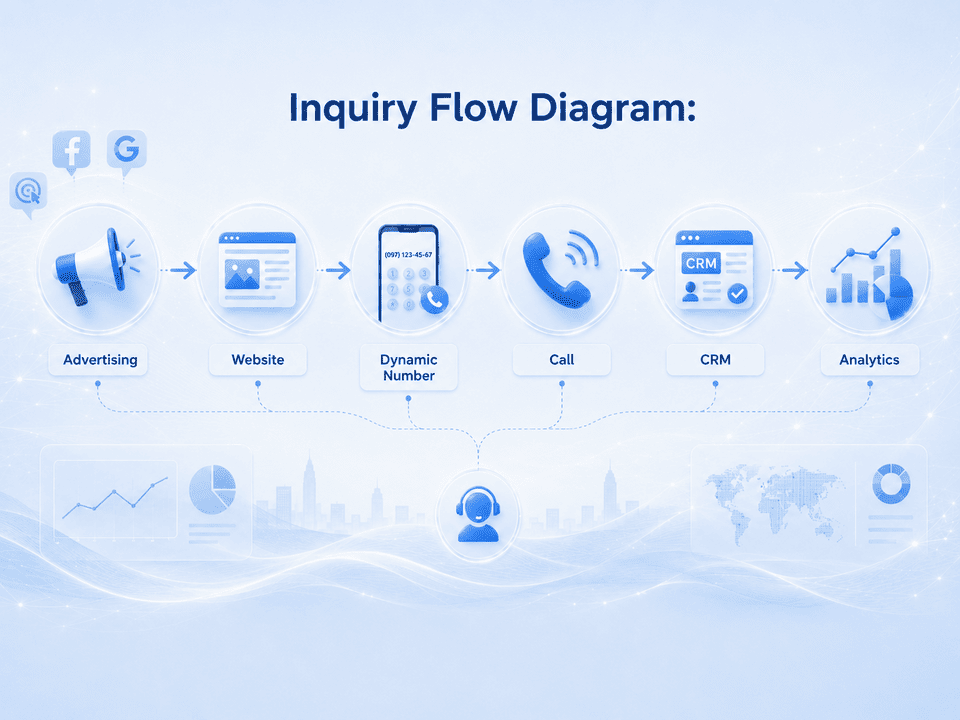
How LiraX call tracking works

1. Visitor goes to the site
The user arrives at the site from Google Ads, a social network, a search engine, a partner site, or another source.

2. The number is being changed on the website
The visitor sees a separate phone number assigned to their advertising source or session.

3. The call goes through LiraX
The system records the call, its source, time, subscriber number, duration, and routing result.

4. Data is transferred to CRM
A contact, request, deal, or task is created in CRM. The call is tied to the corresponding client.

5. Results are included in reports
The manager sees the quantity and quality of calls by advertising channels, campaigns, and managers.

Types of call tracking

Static call tracking

Suitable for monitoring channels without detailing to a specific visitor.
A separate number is assigned to the advertising source:

  • outdoor advertising;
  • billboard;
  • business cards;
  • printed materials;
  • Google Business Profile;
  • marketplace;
  • partner site;
  • separate advertising campaign.

Dynamic call tracking

The number is changed for a specific visitor or session.
Allows you to determine:

  • source and channel;
  • advertising campaign;
  • keyword;
  • advertisement;
  • landing page;
  • UTM tags;
  • Client ID;
  • history of viewed pages.

Combined call tracking

A combination of static numbers for offline sources and dynamic substitution for online advertising.

 
Product LiraX

What data does the system record?

Source data

  • source of transition;
  • channel;
  • advertising campaign;
  • advertisement;
  • search query;
  • UTM tags;
  • referrer;
  • login page.

Visitor data

  • Client ID;
  • Session ID;
  • time of first and current visit;
  • pages viewed;
  • device;
  • browser;
  • geographic data at an accessible level.

Call details

  • subscriber number;
  • call tracking number;
  • date and time;
  • call status;
  • waiting time;
  • duration of the conversation;
  • operator or manager;
  • routing queue or scenario;
  • recording of the conversation;
  • missed or received call.
 

CRM integration

The call immediately becomes part of the customer's story

Main features:

  • customer search by phone number;
  • automatic contact creation;
  • creating a lead or deal;
  • linking a call to an existing agreement;
  • transmission of advertising source;
  • creating a task for the responsible manager;
  • adding a conversation recording;
  • saving the duration and result of the call;
  • automatic processing of missed calls;
  • data transfer via WebHook or API.

Integration with LiraX IP telephony

Call tracking is part of the overall telephony platform.

Features:

  • using LiraX routing rules;
  • redirection to a manager or department;
  • working with Call Center queues;
  • voice message to the operator about the source of the call;
  • different scenarios for different advertising channels;
  • recording telephone conversations;
  • missed call monitoring;
  • automatic callback;
  • evaluating the performance of operators.

Analytics and reports

Evaluate real phone calls, not clicks

Reports are generated in which we receive:

  • number of calls by channel;
  • unique and repeated calls;
  • accepted and missed appeals;
  • average duration of conversations;
  • calls by campaigns and keywords;
  • workload by days and hours;
  • managers' performance;
  • cost of one call;
  • cost of targeted appeal;
  • conversion of calls into deals;
  • income from advertising sources.

Conversation analysis using AI

AI analysis is an additional feature and can be customized according to the company's business processes.

Features:

  • transcribing telephone conversations;
  • automatic resume creation;
  • determining the topic of the appeal;
  • identifying client intent;
  • service quality assessment;
  • search for keywords and phrases;
  • determining the outcome of the call;
  • monitoring compliance with the scenario;
  • automatic filling of CRM fields;
  • classification of calls into targeted and non-targeted.

Handling missed calls

After a missed call, the system can:

  • create a task in CRM;
  • notify the manager;
  • send a message to Telegram or another channel;
  • automatically queue the call for callback;
  • run an automatic callback script;
  • record the advertising source;
  • monitor whether the manager called the client back.

Technical block for the client

The connection is made using JavaScript code that is installed on the site.

Changing numbers on the website

Features:
  • replace the number in the text;
  • replace the number in the tel: link;
  • work with multiple numbers on a page;
  • save the number display format;
  • use a pool of numbers;
  • return the number to the pool after the session ends;
  • work with single-page sites;
  • take into account transitions between pages;
  • transfer data to analytical systems.

Integration with web analytics

List of possible integrations:
  • Google Analytics;
  • Google Ads;
  • Google Tag Manager;
  • Meta Ads;
  • Microsoft Advertising;
  • end-to-end analytics systems;
  • own systems via API and WebHook.

Event Tracking

Possible events:
  • start of the call;
  • received call;
  • missed call;
  • duration beyond a certain value;
  • target call;
  • lead generation;
  • creating an agreement;
  • successful sale.

Who is call tracking suitable for?

01

sales departments

02

online stores

03

medical centers

04

delivery services

05

car services

06

real estate agencies

07

financial companies

08

contact centers

09

advertising agencies

10

companies with a large number of incoming calls

11

businesses that use Google Ads and other paid advertising

Advantages of LiraX call tracking

Single platform

Telephony, call tracking, CRM, Call Center and AI work in one system.

Full history of the appeal

From advertising lead to phone conversation and sales result.

Flexible routing

Calls can be routed based on source, campaign, time, or line of business.

Missed call monitoring

No request remains unprocessed.

API and WebHook

Data can be transferred to your own CRM, ERP, or analytical system.

Recordings and AI analysis

Conversation recordings, transcriptions, summaries, and quality assessments are available.

Several numbers on the Site

On the site, for the convenience and benefit of visitors, several numbers are replaced.

Local and secure solutions

It is possible to deploy components in the customer's controlled infrastructure.

Connection options

Call tracking with LiraX telephony

Full option with routing, records, CRM, and analytics.

For the static option, you must have 1 number for each advertising channel.

For the dynamic option, you need to have a pool of numbers that ensures the peak of visitors to your site.

Cost: - each additional number costs 30 UAH/month.

Call tracking for existing telephony

Connecting numbers and transferring calls to the existing telephone system.

LiraX registers with your provider and redirects all incoming calls to your PBX

For the static option, you must have 1 number for each advertising channel.

For the dynamic option, you need to have a pool of numbers that ensures the peak of visitors to your site.

Cost: - each room costs 30 UAH/month.

Individual integration

Work via API, WebHook and special scripts for corporate infrastructure.

Suitable for companies that have their own IP telephone exchange (for example, Asterisk). Dedicated numbers for call tracking are entered into the LiraX interface. When a call is received and completed at the user's station, a WebHook is sent to LiraX.

The cost of such a service is on request.

Find out which ads really bring in customers

Connect LiraX call tracking, combine advertising analytics with telephony and CRM, and control the entire customer journey — from the first visit to the site to the completed transaction.